

Mascot
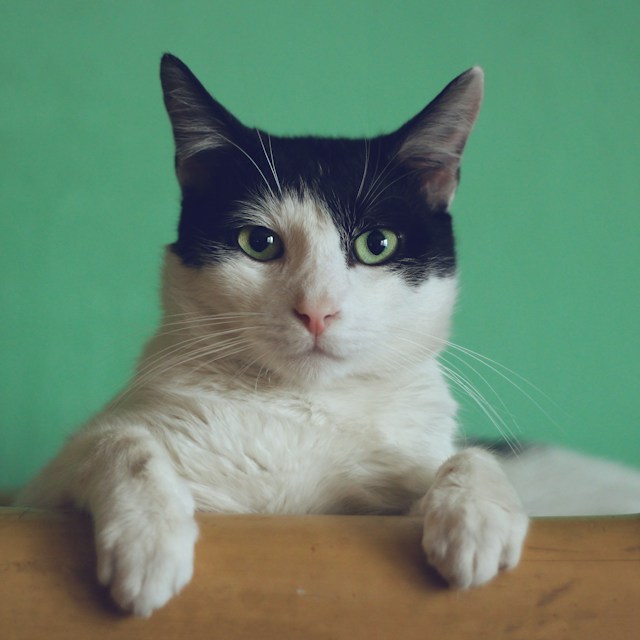
Pet photo → mascot
- What to keep
- Pointed ears and a compact face.
- What to simplify
- Fur texture and the room around the cat.
- Review before use
- Check facial details at 32 px; AI may change the expression.
From reference to identity
Turn a photo, drawing, or original graphic into a simplified logo with AI. Choose a visual style, add editable brand text, and take your favorite mark into website and app assets.
Your image, a new direction
Start with a clear subject. The AI redesigns your reference; review the result before using it as a brand.

This is a recorded style example, not a result from your uploaded image. Generate to create your own logo.

 Check the mark at 16 and 32 px
Recorded outputs from this image-reference workflow, not customer projects. Each case shows the source, settings and a practical review. Results vary between runs.
Mascot


Minimal


Line art


Geometric


Badge


Minimal
Source photographs are credited below; sketch and graphic references were drawn for LogoFoundry. Recorded outputs demonstrate this tool and are not customer endorsements.
An image-to-logo converter uses a photo or sketch as a reference for a new, simplified mark. It redesigns the subject rather than changing a file extension. Brand lettering is added separately so you can edit it.
Choose PNG, JPEG or WebP, up to 4 MB and 20 megapixels. Use the crop controls to remove surroundings. Your preview shows the exact crop sent for generation.
Choose minimal, line art, geometric, badge or mascot. Brand name is optional. Add details to keep or avoid when the reference needs guidance; choose one to four outputs according to your account access.
Compare the source and result. Edit brand text, font, layout and spacing without another AI call. Download PNG, or continue into the website and app asset builder.
A recognizable subject and clear outline give the model a useful starting point. A detailed photograph usually needs simplification before it can work as a small mark.
A pet profile, a coffee cup, a leaf or a clear building outline gives more direction than a busy scene. Crop out people, furniture and other objects you do not need.
Do not crop off the ears, handle, leaf tip or distinctive roofline you want to preserve. Very blurred images cannot reliably supply missing details.
Photograph the page straight on in even light. Use visible lines and remove paper shadows with a crop. The model may interpret a sketch rather than follow every stroke.
Try: “Keep the pointed ears and curved tail. Remove the sofa and fur texture. Use two flat colors.” This identifies what matters more clearly than “make it professional”.
The same cat reference was generated separately in each style. Compare visual density and the silhouette; style choices are directions, not fixed templates.


Choose based on the result you need. These workflows solve different jobs.
Use this image-to-logo tool. It creates a new graphic inspired by the reference and may change details.
Create from an imageUse AI Logo Generator when you have a brand description but no reference image.
Start with a descriptionUse the original artwork for icon resizing. For editable paths, use a dedicated vectorizer or professional redraw; this tool exports raster PNG, not SVG.
Resize existing artworkUse Logo Maker to combine available symbols, text and layout controls without AI generation.
Open Logo MakerThe generated symbol is a raster PNG. The text lockup is composed on your device; export size depends on the selected layout. An SVG wrapper around PNG would not create editable vector paths.
Download the generated symbol or a composed logo. Symbol and stacked compositions export at 1200 × 1200 px; horizontal compositions at 1600 × 900 px. These are canvas sizes, not recovered source detail.
The result reports whether the generated PNG contains transparency. A transparent composition does not remove an opaque background already inside the symbol. Check both light and dark previews.
Pass the finished design to the existing asset builder for favicon, app and PWA outputs. Inspect the symbol at 16 and 32 px before exporting; tiny features may disappear.
For large print, embroidery or editable vector handoff, arrange a vector redraw. Check similarity to other brands before adopting a generated mark; generation does not establish trademark availability.
Image and text logo generation use the same account wallet and trial. Opening another tool does not grant another trial.
Eligible accounts receive 10 trial credits valid for 30 days, enough for one initial logo. Paid-credit accounts can generate up to four at a time and refine a selected result.
Each delivered logo costs 10 credits; AI refinement costs 10. Credits are reserved before generation and undelivered outputs are returned. Text editing, composition and downloads do not use generation credits.
The selected crop is sent to our server and a third-party image service when you generate. It is saved with the task for reference comparison. Access through the app requires your account; underlying storage URLs may be accessible to someone who has the link. The default seven-day cleanup requires the configured scheduled job to run. You can delete finished tasks earlier.
Use images you own or have permission to adapt. Read the current privacy policy and terms for processing, permitted use and the credit-pack refund policy.
Upload a clear photo or sketch, crop to the main subject and choose a style. Generate a mark, compare it with the reference, then add brand text and download PNG.
No. It creates a new design inspired by the image. The “keep the subject” direction asks for recognizable features, but fine details, proportions and shapes may change.
Yes, you can use a photograph as reference. Single subjects usually provide clearer direction. Try minimal or line art and specify which features to keep; a complex scene may need cropping or another source.
Yes. Upload a PNG, JPEG or WebP photo of your sketch. Clear lines, even lighting and a close crop make the drawing easier to interpret.
No. Leave it blank for a symbol-only logo. Add a name in the editor for a text lockup; lettering is composed separately rather than generated inside the image.
This tool currently exports PNG. It does not trace the result into vector paths. Use a dedicated vectorization workflow or professional redraw when you need SVG, EPS or print-ready vector artwork.
The model is asked for transparency, and each result reports its actual alpha state. Transparency is not guaranteed. Choosing a transparent canvas does not remove a background baked into the generated mark.
Eligible accounts can use the shared single-logo AI trial. Additional generation and refinement use credits. See the displayed credit cost before submitting; downloads and local text editing do not consume generation credits.
Cropping is local. Generation sends the cropped reference to the server and a third-party image service. It is stored with the task for comparison and follows task deletion and scheduled cleanup. The complete original is not sent.
Use a tighter crop, select minimal or line art and name the few features that matter. Paid-credit accounts can refine a selected mark. Review results at small sizes; a new reference may work better.
Review the applicable terms and your rights to the reference. Check the output for similarity to existing brands and suitability for your intended use. The tool does not provide trademark clearance or guarantee exclusive rights.